Getting Started with cURL
What Is cURL? (Very Simple Explanation)
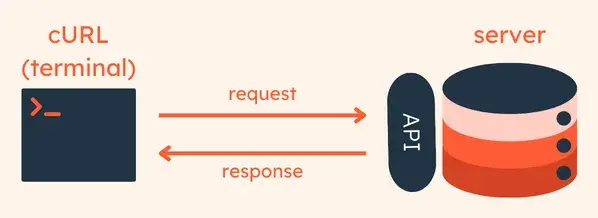
cURL is a command-line tool that lets you send requests to a server and see the response.
In simple words:
cURL helps your computer talk to another computer over the internet.
When you use a browser:
You type a URL
The browser sends a request
The server sends a response (HTML, JSON, etc.)
cURL does the same thing, but without a browser.

Why Programmers Need cURL
Browsers hide many details.
Programmers need to:
Test APIs
Debug backend responses
Send requests without a UI
Automate HTTP calls
Check headers and status codes
cURL is useful because:
It works everywhere
It is fast
It shows raw request and response
It does exactly what you ask (no hidden behavior)
Making Your First Request Using cURL
Let’s start with the simplest request.
curl https://example.com
What happens here:
cURL sends a GET request
Server responds with data
cURL prints the response in the terminal
This is similar to opening example.com in a browser, but you only see the response body.
Understanding Request and Response
Every internet communication follows this pattern:
Request → Server → Response

Request contains:
URL
Method (GET, POST, etc.)
Headers
Optional body (data)
Response contains:
Status code (200, 404, 500)
Headers
Body (HTML, JSON, text)
cURL lets you see and control these parts.
Seeing Response Details (Status & Headers)
To see response headers:
curl -i https://example.com
-imeans “include headers”Useful for debugging API responses
You’ll see:
HTTP status
Content type
Server info
Using cURL to Talk to APIs
Most APIs return JSON, not HTML.
Example API request:
curl https://api.github.com
The response will look like JSON data.
This is how backend and frontend communicate internally.
Sending Data (POST Request)
curl -X POST https://example.com/api \
  -H "Content-Type: application/json" \
  -d '{"name":"Aman","age":20}'
Explanation:
-X POST→ HTTP method-H→ header-d→ request body (data)
This is how:
Forms submit data
Login APIs work
Backend receives input

Common cURL Options (Beginner Useful)
| Option | Meaning |
-X | HTTP method |
-H | Add headers |
-d | Send data |
-i | Show headers |
-v | Verbose (debug mode) |
You don’t need all of them at once.
Use only what your request needs.
Common Mistakes Beginners Make with cURL
1. Forgetting Quotes
❌
-d {name:Aman}
✅
-d '{"name":"Aman"}'
2. Wrong Content-Type
Sending JSON without header causes server errors.
Always add:
-H "Content-Type: application/json"
3. Using GET When API Expects POST
If API expects data:
GET won’t work
Use POST, PUT, or PATCH
4. Thinking cURL Is Only for Backend Devs
Frontend developers use cURL to:
Test APIs before UI
Debug CORS issues
Verify backend responses
How cURL Fits in Real Development

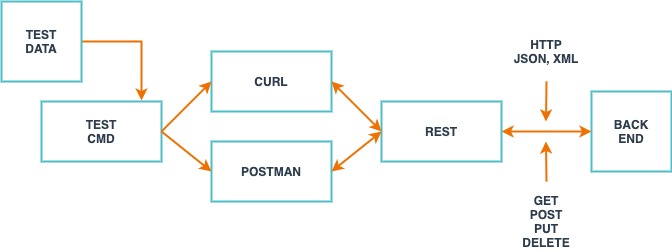
Typical flow:
Backend builds API
cURL tests API
Frontend connects UI
Bugs fixed faster
cURL acts as a bridge between frontend and backend.


